Self-hosting LanguageTool on Mac OS X
On-the-fly spell and grammar checker without sending everything over the internet ...
There are several sets of instructions online, and the following is an amalgamation of them which appears to work. I set this up on Mac OS X Sequoia running on an M4 Pro Mac mini.
Most things can be installed using homebrew coupled with a little tweaking of the configuration files.
Installation
Install LanguageTool : brew install languagetool.
Install fasttext for accurate language recognition : brew install fasttext.
Compile and install fasttext from source.
Create a ./languagetool directory on a fast (e.g. NVME drive) with two subdirectories, fasttext and ngrams.
Download the file containing the model for fasttext language identification : wget https://dl.fbaipublicfiles.com/fasttext/supervised-models/lid.176.bin, but check the most recent filename. This file is ~170 Mb. Place this file in the previously-created fasttext subdirectory.
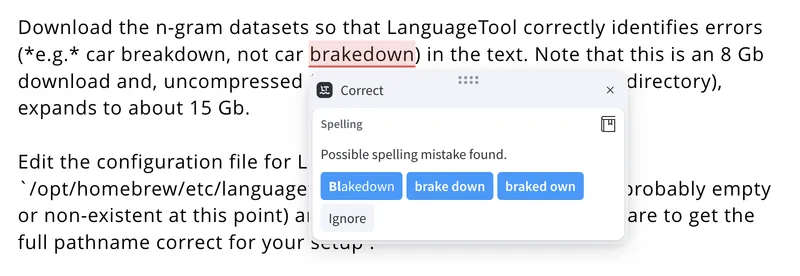
Download the n-gram datasets so that LanguageTool correctly identifies errors (e.g. breakdown, not brakedown) in the text. Note that this is an 8 Gb download and, uncompressed (use unzip into the ngrams subdirectory), expands to about 15 Gb.
Edit the configuration file for LanguageTool /opt/homebrew/etc/languagetool/server.properties (which is probably empty or non-existent at this point) and add the following text, taking care to get the full pathname correct for your setup :
languageModel=/Volumes/Scratch/languagetool/ngrams
fasttextModel=/Volumes/Scratch/languagetool/fasttext/lid.176.bin
fasttextBinary=/opt/homebrew/bin/fasttext
Start the LanguageTool service using brew services start languagetool.
Testing and logging
Check it works ... for example, type the following on the machine LanguageTool is installed on : curl -d "language=en-US" -d "text=a simple test" http://localhost:8081/v2/check
This will return a long JSON-formatted string ... or should if it's working.
LanguageTool logs go to /opt/homebrew/var/log/languagetool/languagetool-server.log, so you can easily find configuration errors or follow it in action (if you like watching paint dry).
Running LanguageTool on a local or public network
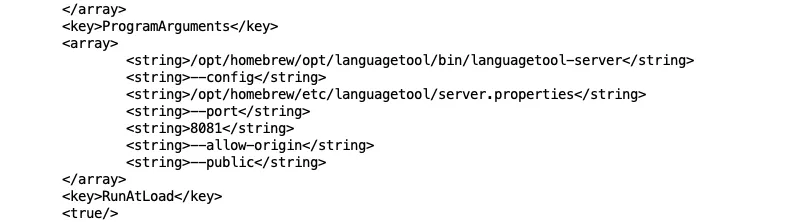
So far, the installation only works on localhost. If you want to run the LanguageTool server and use it over a network you need to pass an additional flag --public on startup.
The startup .plist file can be found by typing brew services list.
However, this file is overwritten on every restart of the service, and the original file resides in /opt/homebrew/Cellar/languagetool/6.5 (with the final numbers being the version you are running, so will likely change). Add the following <string>--public</string> after the line <string>--allow-origin</string> and then restart the LanguageTool server with brew services restart languagetool.
Confirm the LanguageTool server is now accessible over the network using curl -d "language=en-US" -d "text=a simple test" http://IPADDRESS:8081/v2/check where IPADDRESS is either the IP address (see what I did there?) or the name of the computer, e.g. macmini.local.
I wouldn't expose LanguageTool over the internet ... so hide it behind a proxy server.
Client configuration
The endpoint URL for LanguageTool running on a local network is http://IPADDRESS:8081/v2 (usually).
Install the Chrome or Vivaldi browser extension. Click the toothed cog icon in the bottom right-hand corner, scroll down to Advanced settings (only for professional users) - and yes, give yourself a pat on the back at this point - then select either Local server if LanguageTool is installed on the same machine, or Other server (and add the details). There may be other browser add-ons, but I've not used them.
Install the LanguageTool Desktop application, open the Settings and - under the Advanced tab - again select either Local server or Other server.
Note that the Desktop Editor does not appear to be able to use a self-hosted copy of LanguageTool.
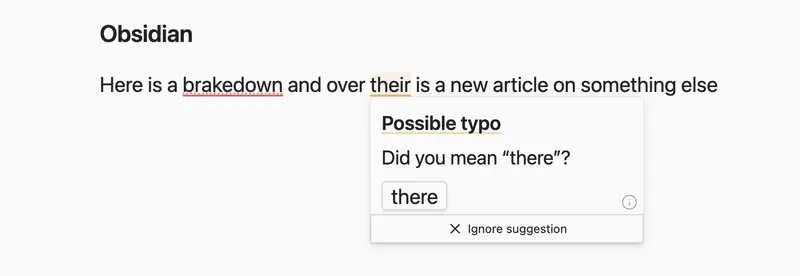
Obsidian's unofficial (community) LanguageTool Integration plugin needs to be setup to use a Custom URL Endpoint of http://IPADDRESS:8081 ... note the missing /v2 which is hardcoded into the plugin.
Custom dictionaries
These reside under /opt/homebrew/opt/languagetool/libexec/ in ./org/languagetool/resource/en/hunspell/spelling_custom.txt (and some variants). You can add words (using a text editor) but this isn't the location that LanguageTool's 'save to personal dictionary' adds words. That location remains elusive. After editing, restart LanguageTool.
Resources
- LanguageTool
- LanguageTool documentation for developers
- Error rules for LanguageTool which can be disabled individually in
server.propertiesusing something likedisabledRuleIds= SENTENCE_WHITESPACE. - LanguageTool forum
- Ben Balter's instructions
- Adrian Philipp's instructions
- Adding words to the LanguageTool dictionaries
- Updating LanguageTool